
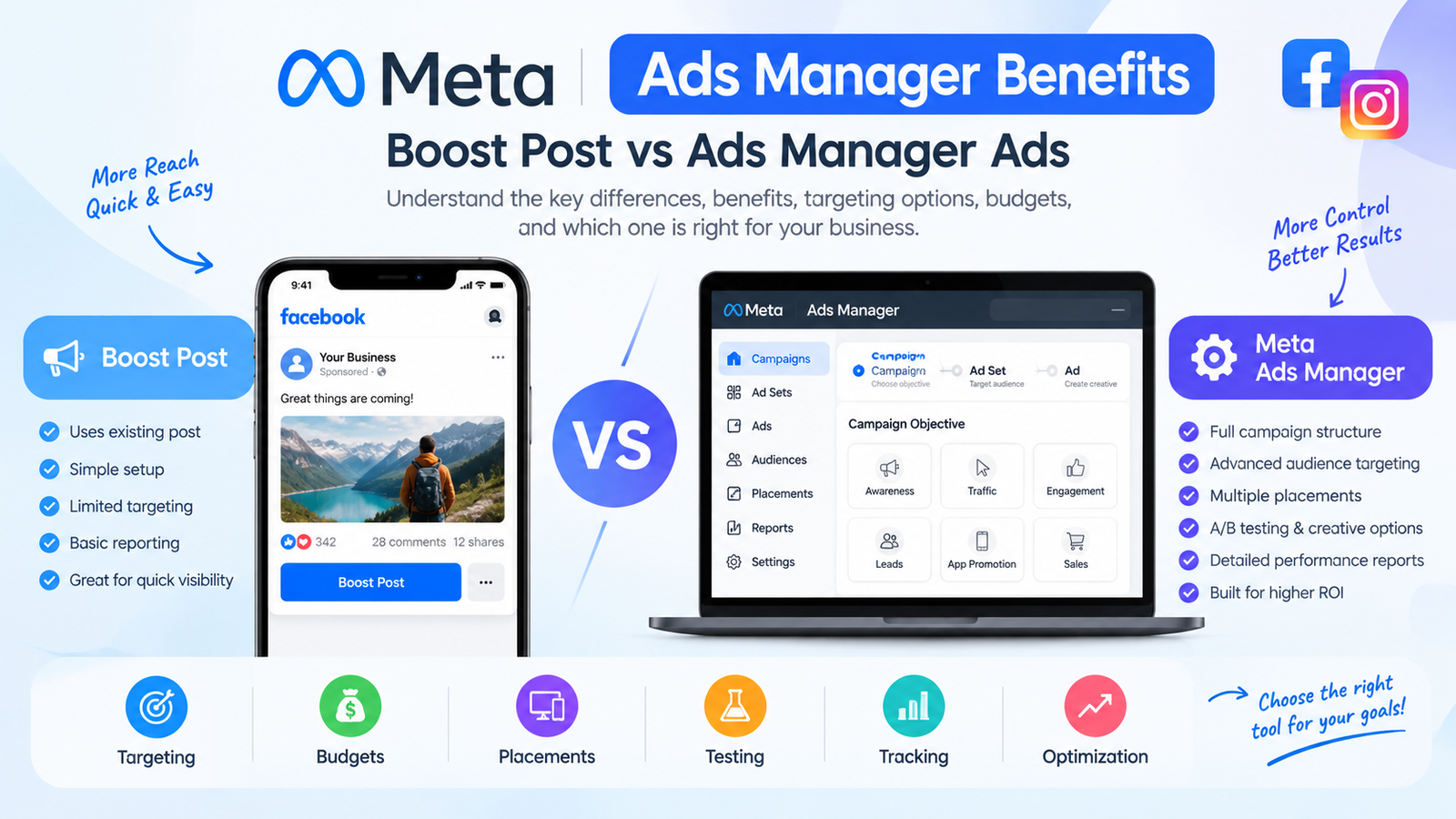
Meta Ads Manager Benefits: Boost Post vs Ads Manager Ads
Meta Ads Manager is one of the main tools businesses use to create, manage, optimize, and measure paid advertising across Meta platforms such as Facebook and Instagram. While Facebook and Instagram make it easy to promote an existing post with a Boost Post button, boosting a post and creating a campaign through Meta Ads Manager are not the same advertising workflow.
The difference becomes especially important when a business wants more control over its campaign objective, audience, placements, budget, creative testing, tracking, optimization, and conversion measurement.
A boosted post can be useful when the goal is simply to put an existing piece of content in front of more people. Meta Ads Manager, however, provides a much more structured environment for building campaigns around specific business outcomes. Meta's current advertising tools also support automated features such as Advantage+ placements and creative optimization, while Ads Manager provides campaign-level controls and reporting.
This guide explains what Meta Ads Manager is, its major benefits, how it differs from boosting a post, when to use each option, and how businesses can build a more effective Meta advertising strategy.
What Is Meta Ads Manager?
Meta Ads Manager is Meta's advertising management platform for creating, editing, monitoring, and analyzing paid advertising campaigns.
Instead of simply promoting an existing Facebook or Instagram post, advertisers can build a campaign around a defined marketing objective and configure different levels of the campaign structure.
A typical advertising setup consists of:
Campaign → Ad Set → Ad
The campaign establishes the overall objective and campaign-level settings.
The ad set is where important delivery decisions such as audience, budget or budget allocation, schedule, and placements are configured.
The ad is the actual creative users see, including the image or video, primary text, headline, call to action, and destination.
This structure gives advertisers a way to organize different audiences and creative variations while keeping campaign performance measurable.
Meta's advertising environment also supports multiple placements and formats. For example, Meta explains that advertisers can use Ads Manager to select placements for Facebook and Instagram Reels and can use either broader automated placement options or manually selected placements.
Why Is Meta Ads Manager Important for Businesses?
Digital advertising is not simply about putting money behind a post. Effective paid advertising starts with defining the desired business outcome and then creating a campaign that is capable of measuring that outcome.
For example, a business may want to:
-
Build awareness for a new brand
-
Generate website traffic
-
Increase social engagement
-
Generate leads
-
Promote an application
-
Generate purchases or other conversions
-
Retarget people who previously interacted with the business
Meta Ads Manager provides the campaign environment for connecting these goals with advertising settings, audiences, creative assets, placements, and measurement.
This is one of the main reasons businesses move beyond simple post boosting as their advertising becomes more sophisticated.
10 Major Benefits of Meta Ads Manager
1. More Control Over Campaign Objectives
One of the biggest benefits of Meta Ads Manager is that campaigns can be created around specific outcomes rather than simply promoting a piece of content.
Current Meta advertising workflows organize campaigns around six major objectives:
-
Awareness
-
Traffic
-
Engagement
-
Leads
-
App Promotion
-
Sales
The objective you select helps determine what type of result Meta's delivery system is trying to achieve.
For example:
-
Awareness can support brand visibility.
-
Traffic can be used to drive people to a destination.
-
Engagement can support interactions or conversations.
-
Leads can support lead collection.
-
App Promotion can support app acquisition.
-
Sales can support conversion-focused campaigns.
These objective names and their available optimization options can change as Meta updates its advertising products, so advertisers should always review the options currently displayed in their own Ads Manager account.
The important principle is simple:
Choose the campaign objective according to the business result you actually want to measure.
For example, a company trying to generate customer inquiries should not automatically judge success by likes and comments.
2. Advanced Audience Targeting
Meta Ads Manager allows advertisers to build campaigns around different types of audiences.
Depending on account setup, campaign type, available data, and Meta's current options, advertisers can work with:
-
Location
-
Age and demographic settings
-
Interests and behaviors where available
-
Custom audiences
-
Website visitors
-
Existing customers
-
People who interacted with content
-
Retargeting audiences
-
Lookalike-style audience strategies
-
Broader or automated audience approaches
Meta has historically supported Custom Audiences and Lookalike Audiences as ways to reach existing users or find people with characteristics similar to an existing audience.
This makes Ads Manager useful for both prospecting and remarketing.
Example
An online store could create separate audience strategies for:
Cold audience: People who have not previously interacted with the business.
Warm audience: People who watched videos, visited the website, interacted with social content, or otherwise showed interest.
Customer audience: Existing customers who may be suitable for repeat purchases or cross-selling.
This approach can create a more structured customer journey than simply boosting the same public post to everyone.
3. Greater Placement Control
Meta ads can appear across different surfaces and formats depending on the campaign setup and eligibility.
These can include environments such as:
-
Facebook Feed
-
Instagram Feed
-
Facebook Stories
-
Instagram Stories
-
Facebook Reels
-
Instagram Reels
-
Messenger
-
Audience Network
Meta's current Ads Manager documentation shows that advertisers can use Advantage+ placements to allow Meta's delivery system to distribute ads across eligible placements, or use manual placements where available.
This matters because different audiences may respond differently to different formats.
For example:
A vertical video may be designed specifically for Reels and Stories, while a product carousel may be more suitable for a catalog-style advertising experience.
Instead of creating one generic promotion and hoping it works everywhere, Ads Manager gives advertisers more flexibility in structuring their creative and placement strategy.
4. Better Budget and Scheduling Control
Meta Ads Manager provides more detailed budget and scheduling options than a simple post promotion workflow.
Depending on the campaign configuration, advertisers can work with:
-
Daily budgets
-
Lifetime budgets
-
Campaign-level budget allocation
-
Ad-set-level budget decisions
-
Start and end dates
-
Scheduling options
-
Automated delivery systems
For larger or more complex campaigns, budget management becomes especially important because advertisers may want to distribute spending across several audiences or creative variations.
For example:
A company may have a $1,000 campaign budget and want to test:
-
Audience A
-
Audience B
-
Creative A
-
Creative B
Ads Manager provides the campaign structure necessary to organize such testing and measurement.
Budget settings and available controls can vary depending on Meta's current campaign setup, so the actual interface should always be checked before launch.
5. Creative Testing and A/B Testing
Another important benefit of Meta Ads Manager is the ability to test different advertising variables.
Instead of assuming that one image, video, headline, or audience will work best, advertisers can create controlled tests.
Possible variables include:
-
Different images
-
Different videos
-
Different hooks
-
Different headlines
-
Different primary text
-
Different calls to action
-
Different audiences
-
Different placements
Meta's advertising resources describe A/B testing as a way to compare different variables and learn which version performs better.
A simple example would be:
Ad A: “Grow Your Business With Digital Marketing”
Ad B: “Get More Customers With a Smarter Digital Marketing Strategy”
If the campaign is structured correctly, performance data can help determine which messaging generates the stronger result for the selected objective.
Testing is particularly valuable because advertising performance should be based on actual data rather than assumptions.
6. More Detailed Performance Reporting
One of the strongest reasons to use Ads Manager is reporting.
A successful campaign should answer questions such as:
-
How much did we spend?
-
How many people saw the ads?
-
How many clicks were generated?
-
How many leads were generated?
-
How much did each lead cost?
-
How many purchases occurred?
-
What was the conversion value?
-
Which audience performed best?
-
Which creative performed best?
-
Which placement performed best?
Depending on the campaign, available tracking, and reporting configuration, advertisers can examine metrics such as:
Impressions, reach, frequency, link clicks, CTR, CPC, CPM, leads, cost per lead, purchases, conversion value, and ROAS.
The important distinction is that Ads Manager allows advertisers to evaluate advertising in the context of a campaign rather than relying only on visible engagement on an organic post.
7. Supports Conversion-Focused Advertising
For many businesses, likes are not the final business goal.
A company may actually need:
-
A product purchase
-
A booking
-
A consultation
-
A form submission
-
A phone call
-
A registration
-
An app event
-
A completed checkout
Ads Manager can be used as part of a conversion-focused advertising system when the appropriate tracking and conversion signals are configured.
This is especially important for ecommerce and lead-generation businesses.
For example, an ecommerce business may monitor:
Ad → Landing Page → Product View → Add to Cart → Checkout → Purchase
That creates a much more meaningful measurement system than simply counting reactions to a social media post.
8. Retargeting Opportunities
Not everyone purchases the first time they interact with a business.
A potential customer might:
-
See an advertisement.
-
Visit the website.
-
Browse several pages.
-
Leave without purchasing.
-
Return several days later.
Retargeting allows advertisers to build strategies around people who have already shown some level of interest, subject to Meta's available audience rules and privacy requirements.
Examples include audiences built from previous interactions with:
-
Websites
-
Social media content
-
Videos
-
Customer lists
-
Other eligible first-party signals
This makes Meta Ads Manager particularly useful for full-funnel advertising strategies.
9. Flexible Creative Formats
Meta advertising supports different creative approaches depending on the campaign and placement.
Advertisers may use:
-
Single images
-
Videos
-
Carousels
-
Reels
-
Stories
-
Catalog-based formats
-
Existing posts where supported
For example, Meta's Reels advertising documentation explains that advertisers can upload Reels-specific creative or use an existing Reel and can access creative optimization options within Ads Manager.
This flexibility allows businesses to create advertising that fits different stages of the customer journey.
10. Scalable Campaign Management
A boosted post may be enough for a single promotional campaign.
But imagine managing:
-
5 campaigns
-
10 audiences
-
20 creative variations
-
Multiple countries
-
Multiple products
-
Different conversion goals
A simple boost button is not designed to provide the same level of campaign organization.
Ads Manager is built for managing larger advertising operations, including multiple campaigns, ad sets, ads, audiences, and performance reports.
That makes it particularly useful for:
-
Marketing agencies
-
Ecommerce businesses
-
SaaS companies
-
Local service businesses
-
Online educators
-
Lead-generation businesses
-
Startups
-
Established brands
What Is a Boosted Post?
A boosted post is an existing Facebook or Instagram post that is promoted with paid advertising.
Instead of creating the advertising campaign through the full Ads Manager workflow, the advertiser starts from the existing post and selects the option to promote it.
The concept is straightforward:
Organic Post → Boost → Paid Distribution
For a business owner who wants to give an existing post additional visibility, this can be a convenient way to start advertising.
Boosting is intentionally simpler than the full Ads Manager experience, with fewer decisions exposed during setup.
Boost Post vs Meta Ads Manager Ads: What Is the Difference?
The most important distinction is simplicity versus control.
A boosted post starts with content that already exists and adds paid distribution.
An Ads Manager campaign can be built specifically around a business objective, audience, placement, creative strategy, and measurement plan.
Boost Post vs Ads Manager Comparison
| Feature | Boosted Post | Meta Ads Manager |
|---|---|---|
| Starting point | Existing social post | New campaign or existing advertising asset |
| Setup | Simple | More detailed |
| Campaign structure | Simplified | Campaign → Ad Set → Ad |
| Objective control | More limited/simplified | More comprehensive |
| Audience control | Basic to moderate depending on current options | More advanced |
| Custom audiences | More limited | Supported through Ads Manager workflows |
| Retargeting | Limited depending on setup | More flexible |
| Placement control | Simplified | Broader control |
| Creative testing | Limited | Multiple ads and testing options |
| Budget control | Simplified | More detailed |
| Conversion optimization | Limited depending on promotion type | Designed for objective-based optimization |
| Reporting | More basic | More detailed campaign reporting |
| Scaling | Limited | Designed for larger campaigns |
| Best use | Quick promotion | Structured advertising |
| Learning curve | Lower | Higher |
Specific features available through a Boost workflow can change over time, but the fundamental distinction remains: Boost is designed as a simplified promotion workflow, while Ads Manager is the more comprehensive campaign-management environment.
Boost Post vs Ads Manager: A Practical Example
Consider a restaurant that publishes this Facebook post:
“Weekend Special: Get 20% Off Selected Meals. Visit us this Saturday!”
The owner could click Boost Post and pay to show the post to more people.
That may be suitable when the objective is simply to increase local visibility for the announcement.
Now consider a second campaign.
The restaurant wants to:
-
Reach people within a defined geographic area
-
Test two different offers
-
Send users to an online ordering page
-
Retarget people who visited the website
-
Measure completed orders
-
Compare creative performance
This is where a structured Ads Manager campaign becomes much more useful.
The difference is not simply that one option is “easy” and the other is “advanced.”
The real difference is what the advertising is designed to accomplish and how much control the advertiser needs.
When Should You Boost a Post?
Boosting an existing post can make sense in situations such as:
Promoting a strong organic post
If a post is already receiving useful engagement organically, adding paid distribution may help expose that content to a larger audience.
Promoting announcements
Examples include:
-
Events
-
Product announcements
-
Opening updates
-
Special offers
-
Community news
-
Brand announcements
Quick local visibility
A local business may want a fast and simple way to put an existing post in front of more nearby people.
Beginners learning paid social
Someone new to Meta advertising may find the simplified workflow easier to understand before learning the full Ads Manager environment.
However, advertisers should judge the results against the actual objective. A post receiving many likes is not automatically a business success.
When Should You Use Meta Ads Manager?
Ads Manager becomes more useful when you need structured advertising and measurable business outcomes.
Consider Ads Manager when you want to:
Generate leads
For example:
-
Real estate inquiries
-
Agency leads
-
Consultation requests
-
Education inquiries
-
Service bookings
Generate sales
For ecommerce businesses, advertising may need to focus on measurable customer actions rather than post engagement.
Build retargeting campaigns
You may want to show different ads to people who have previously interacted with your brand.
Test audiences
You may want to compare different audience strategies rather than letting one simple promotion run.
Test creative
You may need several variations of videos, images, headlines, and hooks.
Scale campaigns
The larger your advertising operation becomes, the more valuable campaign structure and reporting become.
What Happens If Your Meta Ads Account Gets Restricted?
Meta advertising accounts can sometimes face delivery or access restrictions, which can prevent campaigns from running normally. When this happens, advertisers should first identify the reason for the restriction and review the available account and policy information.
For a practical guide on diagnosing and addressing advertising restrictions, see our guide on how to fix a restricted Meta Ads account.
Understanding account restrictions is particularly important when managing campaigns through Meta Ads Manager because uninterrupted account access is essential for campaign monitoring, optimization, and scaling.
Is a Boosted Post Cheaper Than a Meta Ad?
This is one of the most common questions.
There is no universal rule that says a boosted post is always cheaper or that an Ads Manager campaign is always cheaper.
The cost of advertising depends on factors such as:
-
Campaign objective
-
Audience
-
Competition
-
Placement
-
Creative quality
-
Budget
-
Geographic market
-
Seasonality
-
Conversion signal
-
Landing page experience
-
Campaign setup
A cheaper click is not necessarily a cheaper customer.
For example:
Imagine Campaign A generates:
1,000 clicks at $0.20 per click
Campaign B generates:
500 clicks at $0.50 per click
At first glance, Campaign A appears cheaper.
But if Campaign A generates only two customers and Campaign B generates twenty customers, the lower CPC does not mean Campaign A was the better business result.
This is why advertisers should evaluate the metric that is closest to the real business objective.
Does Boosting a Post Mean You Are Running Facebook Ads?
Yes, in the broad sense that you are paying Meta to distribute promotional content.
However, boosting a post is not the same as using the full Meta Ads Manager workflow.
The important difference is the level of advertising control and campaign management.
It is better to think about the two as:
Boost Post = simplified paid promotion
Ads Manager = structured advertising campaign management
This distinction helps avoid the common mistake of treating every form of paid distribution as identical.
Meta Ads Manager Campaign Structure Explained
Understanding the campaign structure is essential for beginners.
Campaign
The campaign is the highest level.
This is where you define the broad marketing outcome.
Example:
Campaign: Website Sales – September 2026
Objective:
Sales
Ad Set
The ad set controls important delivery decisions.
For example:
Ad Set 1: Pakistan – Broad Audience
Ad Set 2: Pakistan – Retargeting
Ad Set 3: Lookalike/Prospecting Audience
Depending on the campaign setup, this is where advertisers work with elements such as audience, placements, schedule, and budget-related settings.
Ad
The ad is the actual advertisement.
Example:
Ad 1: Product Video
Ad 2: Product Image
Ad 3: Customer Testimonial
This structure allows advertisers to compare different creative approaches within an organized campaign.
How to Create a Meta Ads Manager Campaign
The exact Ads Manager interface can change as Meta releases new advertising features, but the general process is:
Step 1: Define the Business Goal
Start by answering:
What should the customer do?
Examples:
-
Visit the website
-
Submit a lead form
-
Start a conversation
-
Download an app
-
Purchase a product
Do not begin by asking which button to click. Begin by defining the business result.
Step 2: Select the Campaign Objective
Choose the objective that most closely matches the desired outcome.
Current Meta campaign categories include Awareness, Traffic, Engagement, Leads, App Promotion, and Sales.
Step 3: Define the Audience
Determine who should see the advertisement.
Consider:
-
Location
-
Demographics
-
Existing customer data
-
Website visitors
-
Content engagement
-
Prospecting audiences
-
Retargeting audiences
Avoid making the audience unnecessarily complicated without a strategic reason.
Step 4: Set the Budget and Schedule
Choose an appropriate budget and campaign duration.
For testing, a smaller controlled budget can help you gather initial performance information before increasing spend.
Do not scale simply because an advertisement receives many impressions.
Scale based on meaningful performance data.
Step 5: Choose Placements
Depending on the campaign, you may use Meta's automated placement options or select specific placements manually.
Meta currently promotes Advantage+ placements as a way of allowing its delivery system to distribute eligible ads across available placements and attempt to make efficient use of the advertising budget.
Step 6: Create the Ad
Develop the:
-
Primary text
-
Headline
-
Image or video
-
Call to action
-
Destination URL
Your advertisement should clearly communicate:
Problem → Solution → Benefit → Action
Step 7: Review Tracking
Before running conversion campaigns, make sure relevant tracking and conversion signals are correctly configured.
For a website campaign, this may involve Meta's website tracking technologies and server-side measurement tools where appropriate.
Tracking quality matters because the advertising system needs meaningful data to evaluate outcomes.
Step 8: Monitor Performance
Do not judge a campaign only by likes.
Look at the metrics relevant to your objective.
For example:
Lead campaign
-
Leads
-
Cost per lead
-
Lead quality
Sales campaign
-
Purchases
-
Cost per purchase
-
Conversion value
-
ROAS
Traffic campaign
-
Link clicks
-
Landing page views
-
Cost per result
Awareness campaign
-
Reach
-
Impressions
-
Frequency
-
Video-related metrics where applicable
Common Meta Ads Manager Mistakes to Avoid
Mistake 1: Choosing the objective based on vanity metrics
A campaign created to generate sales should not be judged primarily by likes.
Always connect the KPI to the actual business goal.
Mistake 2: Changing too many things at once
If you change the audience, creative, budget, placement, and objective simultaneously, it becomes difficult to identify what actually changed performance.
Testing should be structured.
Mistake 3: Creating too many ad sets
More campaigns do not automatically mean better performance.
Overcomplicated account structures can make testing and budget allocation harder, particularly when the total budget is small.
Mistake 4: Ignoring creative quality
Advanced targeting cannot completely compensate for weak creative.
The ad needs:
-
A strong hook
-
Clear messaging
-
A relevant visual
-
A compelling benefit
-
A clear CTA
Mistake 5: Measuring only clicks
Clicks are not always the final goal.
A business may need:
Qualified leads → appointments → customers
or
Product views → carts → purchases
The deeper the measurement, the better the business can understand advertising effectiveness.
Mistake 6: Scaling too quickly
A campaign that performs well for a short period should not automatically receive a huge budget increase.
Scaling should be based on stable performance, conversion volume, and business economics.
Boosted Posts and Ads Manager Can Work Together
Businesses do not necessarily have to choose one forever.
A practical content strategy may look like this:
Step 1: Publish organic content
Create useful posts, videos, Reels, tutorials, case studies, and promotional content.
Step 2: Identify strong content
Look at which content attracts meaningful engagement or demonstrates audience interest.
Step 3: Use paid promotion strategically
A suitable post may be boosted when the goal is simply to extend its visibility.
Step 4: Build structured campaigns in Ads Manager
For lead generation, sales, remarketing, testing, and scaling, use the appropriate Ads Manager campaign structure.
This creates a connection between organic social media content and paid social advertising.
Meta Ads Manager vs Boost Post: Which One Fits Your Goal?
Rather than asking which tool is universally better, ask:
What am I trying to achieve?
| Your Goal | More Suitable Approach |
|---|---|
| Give an existing post more visibility | Boost Post |
| Promote a simple announcement | Boost Post |
| Quickly promote local content | Boost Post |
| Generate measurable leads | Ads Manager |
| Drive ecommerce purchases | Ads Manager |
| Build retargeting campaigns | Ads Manager |
| Test several creatives | Ads Manager |
| Test audiences | Ads Manager |
| Manage multiple campaigns | Ads Manager |
| Analyze detailed campaign performance | Ads Manager |
| Scale a structured paid-media strategy | Ads Manager |
The correct choice depends on the campaign's objective, available tracking, budget, audience, and desired level of control.
Meta Ads Manager Benefits for Small Businesses
Small businesses sometimes assume that advanced advertising tools are only useful for large companies.
That is not necessarily the case.
A small business can benefit from Ads Manager because it can create a measurable advertising process around a limited budget.
For example, a local service business could create a campaign focused on leads.
The journey could be:
Facebook/Instagram Ad → Landing Page or Lead Form → Customer Inquiry → Sales Follow-Up
The business can then calculate:
Advertising Spend ÷ Qualified Leads = Cost Per Qualified Lead
That number is often more meaningful than simply counting post likes.
Meta Ads Manager Benefits for Ecommerce
Ecommerce businesses can use Ads Manager to build campaigns around the customer journey.
A simplified funnel may include:
Awareness → Product Interest → Website Visit → Add to Cart → Purchase
Advertising can then be structured around:
-
New customer acquisition
-
Product promotion
-
Retargeting
-
Catalog advertising
-
Conversion campaigns
-
Creative testing
Meta's current advertising ecosystem also supports automated tools designed to help advertisers manage audience, placement, and creative optimization.
Meta Ads Manager Benefits for Marketing Agencies
For agencies, structured campaign management becomes even more important.
An agency may manage advertising for:
-
5 clients
-
20 clients
-
50 clients
Each account may have different:
-
Objectives
-
Audiences
-
Budgets
-
Creatives
-
Tracking systems
-
Reporting requirements
Ads Manager provides the campaign infrastructure needed to keep those advertising activities organized.
How to Improve Meta Ads Performance
Using Ads Manager does not automatically produce successful campaigns.
The tool is only one part of the advertising system.
A strong campaign usually requires several elements working together.
1. Clear offer
People need a reason to take action.
2. Strong creative
The image or video needs to attract attention quickly.
3. Relevant messaging
The advertisement should speak directly to the intended audience.
4. Correct objective
Choose the objective that reflects the intended business outcome.
5. Appropriate audience
Do not target people who are unlikely to benefit from the offer.
6. Quality landing page
A great ad cannot fully compensate for a poor destination page.
7. Accurate tracking
Without meaningful measurement, optimization becomes guesswork.
8. Continuous testing
Use data to improve the offer, creative, audience, and campaign structure.
The Most Important Difference Between Boosting and Ads Manager
The biggest difference can be summarized in one sentence:
Boosting is primarily a simplified way to promote existing content, while Meta Ads Manager is a complete environment for building and managing structured advertising campaigns.
A boosted post can be useful when the goal is quick distribution.
Ads Manager becomes increasingly valuable when advertising needs:
Strategy + Targeting + Optimization + Testing + Tracking + Scaling
That distinction is more important than simply asking which button produces cheaper clicks.
Final Thoughts
Meta Ads Manager is more than a tool for creating Facebook ads. It is a complete advertising environment that helps businesses connect their marketing objectives with audience targeting, creative development, budget management, placements, measurement, testing, and optimization.
A Boost Post can be useful when you want a simple way to give an existing post additional paid exposure. But when the goal becomes more specific—such as generating leads, increasing ecommerce sales, retargeting website visitors, testing multiple audiences, or scaling campaigns—Ads Manager provides a more structured approach.
The key is not to treat every campaign the same.
Start with the business goal.
Then choose the appropriate objective, audience, creative, budget, tracking, and measurement system.
When advertising decisions are based on measurable outcomes rather than vanity metrics, businesses have a clearer foundation for improving their Meta advertising strategy over time.
Key Takeaways
Meta Ads Manager is designed for structured campaign management.
Boost Post is a simplified way to promote existing Facebook or Instagram content.
Ads Manager provides greater control over campaign objectives, audiences, placements, creative testing, budgets, and reporting.
Boosted posts can be useful for quick content promotion and visibility.
Ads Manager is more suitable for businesses that need structured lead generation, sales, retargeting, testing, measurement, and scaling.
The most important metric is not always likes or clicks. The right KPI depends on the actual business objective.


Reader Comments (0)
No comments yet. Be the first to share your thoughts below!